You are currently viewing Creating Fast Content Structures With Bulleted Lists
Photo By Artsy Course Experts

Creating Fast Content Structures With Bulleted Lists

I love using bulleted lists on Word, Google Docs, Slides, text editors to create quick and strong outlines.

Once you start a bulleted list, you can just type a few words and hit enter for the next bullet. So it’s a super easy tool to brainstorm and get all your best ideas out and ready for editing.

Outlines are also a great way to brainstorm on a course curriculum or to figure out the key points for a module. Also, visually looking at the list gives you insight into the right teaching sequence as you build up your skills.

Your module or lesson names can be draft brief like “Photo Lenses” or long and realistic “How to create cups with text on your Cri cut.”

After you get your top-level list done, say class modules, you can start adding children underneath each module by using the tab key. Most editors will accept a tab key or have an editor button to shift the bullet right. Once you shift right to create child topics, hitting enter will create the next child topic. You can also Shift Tab or use an Untab Left button to go back to the parent list.

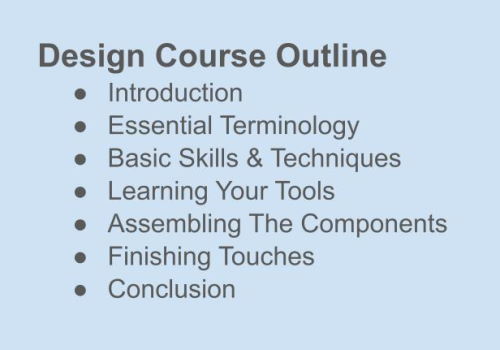
Example Course Outline:

  • Module 1 name, maybe Introduction to Topic
  • Module 2 name
  • Module 3 name
    • Lesson 3, topic A
    • Lesson 3, topic B
    • Lesson 3, topic C
  • Module 4 name
  • Module 5 name, Conclusion

Another cool thing about lists is that you can be creative and jump around, edit, reorder, copy & paste, duplicate and tweak sections, and more. You can even use styles like bold, italics, strikeout, text colors, highlight colors, and more to mark up your content.

Finally, if you wanted to you can even go to a higher level to brainstorm on talking or topical points. For these, you can stay brief or go ahead and write out a full paragraph if it flows out from you naturally.

In conclusion, brainstorming on paper like on your journal or notebook has its place, especially if you are sketching visuals, but if you just want to crank out a course or lesson outline, try getting in the zone with a nice bulleted list to quickly create valuable content.

FAQ Creating Fast Content Structures With Bulleted Lists

Bulleted lists give you clarity and make information easier to digest. They also give you speed. You can easily highlight your main ideas and feed in more ideas for easy comprehension. It helps you stay organized. It also gives your content general visual appeal.

Keep the list concise, start each new point with the same part of speech, such as pronouns, use the same bullet points throughout your content, and be specific in your point.

You can use numbered lists if your steps require a particular ranking or order. You can use bullet points if there is no order or the items are all significant.

Yes, search engines often feature bulleted lists in rich snippets, and this improves visibility. Ensure your lists are clear, relevant, and keyword-optimized.

No, only the first word in each bullet point and proper nouns should be capitalized following the standard sentence capitalization rules.

You should be a little more smarter now. Thanks for hanging out!

Please subscribe to get more tips for creative online course teachers.

These lessons can also help you with Education and Course Content:

Want All New Lessons Emailed Instantly?

Get smarter every week with new lessons for creative training CEOs

Made specifically for creatives pros teaching with courses, websites, communities, or socials.

Topics include technology, e-learning, marketing, sales, operations, multimedia, admin, and more.

Join now to get ahead with next valuable lesson.

⭐⭐⭐⭐⭐ Trusted by 8,000+ creative pros

PS. We’ll never sell your info, never send spam, and you can stop anytime.

Would This Lesson Help A Friend?

If this lesson can also help someone you know, it's supa' easy to share.

Other Helpful Lessons

Keep learning 📚 how to plan, build, maintain, and scale your creative training business. What's your NEXT topic?

Need Tech Work From A Partner Who Gets What You Do?

We’ll keep your company systems working and improving while you create and teach

Image Not Found

Check

We’ll inspect the health, logs, and statistics across every component and constantly monitor for problems.

Image Not Found

Update

We’ll keep every part of your tech up to date with the latest features, bug fixes, and security patches.

Image Not Found

Fix

We’ll fix any problems that come up in your systems – like wrong logic, broken forms, and bad integrations.

Image Not Found

Enhance

We’ll make your student experiences awesome, beautiful, reliable, fast, accessible, and mobile-friendly.

Wanna Chat About Your Specific Problems and Goals?

Let’s get your creative training company unstuck and growing

Got questions about your courses, website, community, email, or other systems?

Let’s talk about your situation, current challenges, and future goals.

Together, we’ll brainstorm on a few smart options to level up your system and business.

Prefer to write a message? Use web form